

Profile overview
Identity, headline numbers and the contribution graph.
/torvaldsType a username or owner/repo. Get a banner that updates itself, as SVG or PNG, for your README, X header, LinkedIn and link previews.

gitbanners.com/you is a page. Add .svg or .png and it is the image. GitHub data refreshes every 15 minutes, so a banner you pasted once keeps telling the truth.
| URL | What you get |
|---|---|
gitbanners.com/{user}.svg | Profile overview |
gitbanners.com/{user}/activity.svg | Only the contribution graph |
gitbanners.com/{user}/repos.svg | Top repositories and activity |
gitbanners.com/{owner}/{repo}.svg | Repository overview |
gitbanners.com/{owner}/{repo}/contributors.svg | Contributors with avatars |
gitbanners.com/{org}.svg | Organization overview |
gitbanners.com/embed/{user} | Extension-less image URL for embedding |
Sixteen presets cover the things people put in a README or a header: who you are, what you ship and who you ship it with.
Overview, activity only, stats, top repositories, languages, streak, a compact card and a year in review. Works for any public account.
Identity, headline numbers and the contribution graph.
/torvalds
Just the contribution graph: the quietest README banner.
/markeljan/activity
Pinned and most-starred repositories above the graph.
/sindresorhus/repos
Commits, pull requests, issues and stars in any theme.
/gaearon/stats?theme=dracula
Current and longest contribution streak.
/shadcn/streak?theme=tokyo-night
Language mix across top repositories.
/antfu/languages?theme=catppuccin-mocha
1500 by 500, with the photo area kept clear.
/torvalds?size=x
A poster of one calendar year, made for sharing.
/torvalds/wrapped?year=2025Overview with the language bar, a year of commit activity, contributors with avatars, the latest release and a social preview sized for GitHub's upload.

Description, stars, forks and the language bar.
/vercel/next.js
A year of weekly commits.
/vercel/next.js/activity
The people behind a project, with avatars.
/facebook/react/contributors
1280 by 640, ready to upload as the repository's social preview.
/vercel/satori/socialMembers, repositories and stars of a whole organization, its top repositories, and the combined commit activity of its most active projects.

Members, repositories and stars of a whole organization.
/vercel
The most-starred repositories of an organization, light theme.
/microsoft/repos?theme=github-lightREADME, X header, LinkedIn banner, link preview, GitHub social preview and square. In the studio a dashed area shows where each site puts your profile photo, and the layout keeps clear of it.
size=readme
size=og
size=x
size=social
size=linkedin
size=squareThe default is GitHub's own dark theme, colour for colour. There are 24 themes in all, including GitHub light and dimmed, Dracula, Tokyo Night, Catppuccin, Nord, Gruvbox and Solarized, and every colour can be overridden in the URL. Browse all themes.
https://gitbanners.com/markeljan.svg?theme=tokyo-night
https://gitbanners.com/markeljan.svg?bg=0b1021&accent=ff7ac6&heat=a855f7Every banner comes with a snippet. The plain Markdown one works everywhere; the picture one follows the reader's light or dark GitHub theme.
[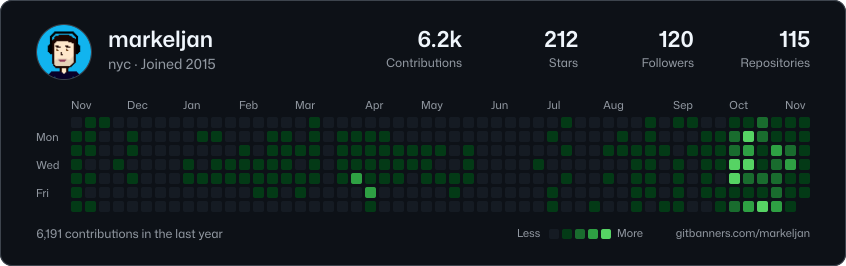](https://gitbanners.com/markeljan)<a href="https://gitbanners.com/markeljan"><img src="https://gitbanners.com/markeljan.svg" alt="GitHub banner for @markeljan: 6,191 contributions in the last year, 212 stars, 120 followers."></a><a href="https://gitbanners.com/markeljan">
<picture>
<source media="(prefers-color-scheme: dark)" srcset="https://gitbanners.com/markeljan.svg?theme=github-dark">
<img src="https://gitbanners.com/markeljan.svg?theme=github-light" alt="GitHub banner for @markeljan: 6,191 contributions in the last year, 212 stars, 120 followers.">
</picture>
</a>https://gitbanners.com/markeljan.svgIf your stats, trophy or activity card shows a broken image, paste your README into the README doctor. It finds image URLs that point at dead card servers and gives you working ones back.
Every banner, preset, size and theme is free, with no sign-in. Pro costs one star on markeljan/gitbanners and adds the things you want once a banner is part of your profile. See pricing.
| Feature | Free | Pro |
|---|---|---|
| Live banners, all presets, sizes and themes | Yes | Yes |
| SVG and PNG, custom colours | Yes | Yes |
| Saved banners with stable links | 3 | 50 |
| GitBanners mark on saved banners | Shown | Removable |
| Animated contribution graph (SVG) | No | Yes |
| Your own default banner at your profile URL | No | Yes |
| Refresh at the edge | 15 minutes | 5 minutes |
| Price | $0 | One GitHub star |
GitBanners is built to be used by software as much as by people. Nothing needs a key or an account.
.md to the URL or send Accept: text/markdown./api/v1, described by OpenAPI, with standard rate-limit headers and problem+json errors.Copy the Markdown under any banner and paste it into your README, for example [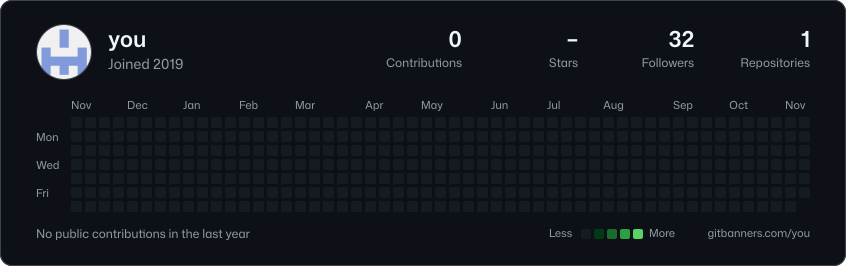](https://gitbanners.com/you). For a profile README, the file lives in a repository named after your username.
GitHub data is refreshed every 15 minutes, and the image cache GitHub puts in front of READMEs follows that timing. Headers on X and LinkedIn are uploads, so download a fresh PNG when you want to update them.
No. Anything public works with just a name. Sign in with GitHub to save banners, and star the repository to unlock Pro. Signing in asks GitHub for no permissions beyond your public profile.
Yes, as counts only. Turn on "Private contributions" in your GitHub profile settings and GitHub includes them in your graph, so your banner shows them too. Names of private repositories never appear on a banner.
SVG and PNG. Presets for README (846 px wide), X header (1500 by 500), LinkedIn banner (1584 by 396), link preview (1200 by 630), GitHub social preview (1280 by 640) and square (1080 by 1080), or any custom size.
Pro removes the GitBanners mark from saved banners, adds animated SVG, 50 saved banners instead of 3, your own default banner at your profile URL and faster refresh. It costs one star: sign in with GitHub and star the markeljan/gitbanners repository.
Yes. Cards that point at a paused or rate-limited server show a broken image. Swap the image URL for a GitBanners one, or paste your README into the README doctor and copy the fixed version.
Yes. Content pages and banner pages have a Markdown version (add .md or send Accept: text/markdown), there is a keyless JSON API described by OpenAPI, an MCP server with read-only tools, and an llms.txt index.